
COVID-19, remote work, and telework
Legal regulations concerning remote work, introduced in March 2020 as part of the Anti-Crisis Shield, facilitated employers in directing employees to work outside the office.
The solution proposed in the Shield was intended to be flexible; therefore, employers were exempted from the obligation to obtain employee consent for remote work, and the requirement to regulate the principles of such work in agreement with the employee or trade unions was also waived. These facilitations distinguished remote work introduced through the Shield from telework, which had long been regulated in the Labor Code.
Remote work was meant to be a temporary instrument, used solely to combat the coronavirus; however, its prevalence, effectiveness, and economics may influence an increased interest in such a model of employment—both from employers and employees.
Experiences from the epidemic period indicate that employers may change their attitude towards working from home, which no longer needs to be an exception to accepted norms but can become the “new normal,” as another permanent element in the pursuit of efficiency and cost reduction. Consequently, the epidemic may permanently influence the way we will work in the future, regardless of whether the legislator decides to extend the validity of temporary legal regulations. Assuming that working from home “will be with us for longer,” employers should ensure that considerations of employee convenience, as well as care for the efficiency and economics of the adopted work model, do not overshadow concerns for the security of data and business information. There is no doubt that data and information are crucial for contemporary organizations.
Security of working from home, use of business and personal tools
Concern for the security of using electronic devices has always included ensuring proper configuration, software updates, and analysis of potential vulnerabilities. These activities are easier when the device remains in the employer's office, where, in addition to ongoing supervision by staff, devices are subject to security measures such as electronic locks, video surveillance, or building security. However, if employees take such a device outside the protective zone of the office, and the device still has direct access to confidential data and information resources – additional security measures must exist either within the device itself or in the IT infrastructure to which the device connects. One must also not forget the aspect of the device's communication with the infrastructure and the appropriate training of the employee. Competition, economic considerations, and concern for employee convenience dictate even further-reaching solutions. This refers to the possibility for employees to use their own tools, such as a personal laptop or phone, to perform assigned work (hence the name “Bring Your Own Device” or BYOD).
According to a report prepared by Bitglass, nearly 70% of surveyed employers allow employees to use personal devices for work purposes. Meanwhile, a report by Hexa Research contains a forecast that the BYOD market, valued at $94 billion in 2014, is expected to exceed $350 billion by 2024.
What does the development of BYOD mean for entrepreneurs? All previous challenges related to the security of using any portable devices outside the office remain relevant. The BYOD trend presents new, additional challenges resulting from the use of personal devices over which the employer does not have full control.
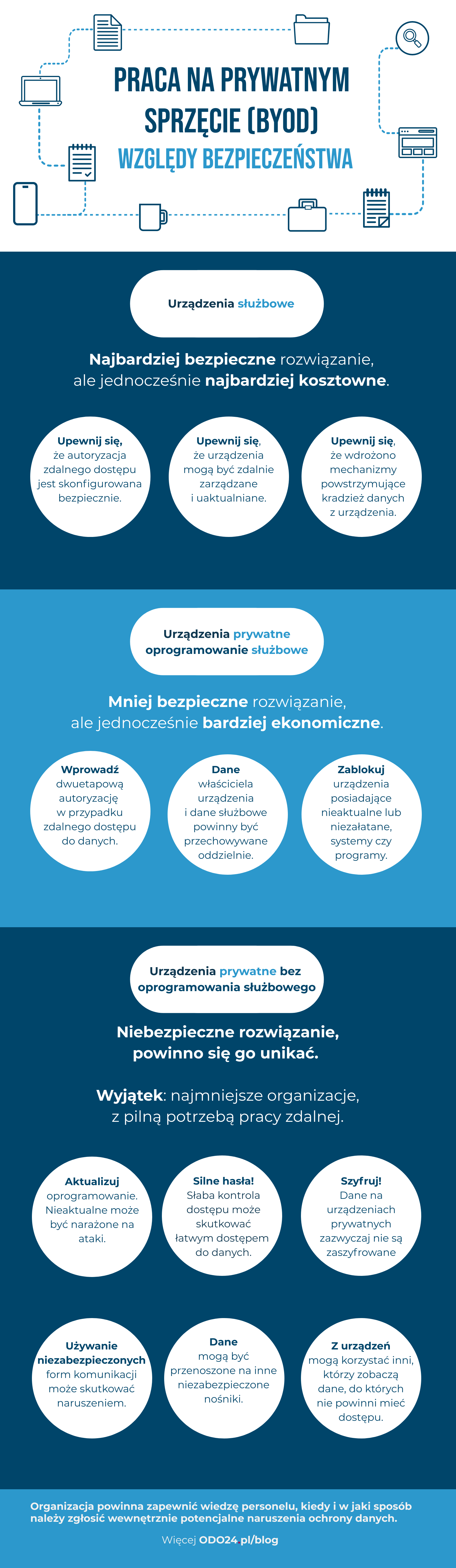
The British supervisory authority (ICO – Information Commissioner’s Office) distinguishes three typical business models concerning the use of portable electronic devices for work purposes:
- use of company devices provided by the employer,
- use of personal devices, but utilizing the employer's software and infrastructure,
- use of private devices, without utilizing the employer's software and infrastructure.
The choice of the appropriate model depends on the individual needs and capabilities of a given entrepreneur. If cost is not a concern and the only significant factor is security, it is advisable to adopt a model based on company devices (the first of the above models). This solution provides the highest level of security, at the cost of the highest implementation expense. In this model, the following will be crucial:
- ensuring the ability to remotely manage and update the device, protection against unauthorized access to the device,
- implementing mechanisms to secure data on the device, e.g., encryption,
- ensuring secure access to the infrastructure, including secure authorization procedures.
The other two models allow for the use of private devices for business purposes, differing in the level of security that the employer provides for business data.
The last model is, of course, the most economical but the least secure. Such a solution may be acceptable in the case of sole proprietorships or in the smallest organizations that do not have the capacity to implement other solutions.
In this situation, the most interesting seems to be the intermediate model, which is based on private devices and the use of company software and infrastructure. This model attempts to strike a balance between economic considerations and security.
Security – private device with company software and infrastructure
Migrations, Clouds, Systems.
GDPR in IT.
The use of MDM solutions in an intermediate model (i.e., personal devices used for business purposes) is the most secure for the employer, but may encounter resistance from employees who may have concerns about any interference by the employer in their personal devices. An example of unwanted interference could be the enforcement of device locking rules, blocking the installation of any applications, prohibiting the use of personal cloud services, or blocking Bluetooth protocol. From the employee's perspective, it is also uncomfortable to be aware that the employer may have the technical capability to monitor the device's location or erase all data stored on the device, including private data.
The response to the above concerns of employees, as well as the popularization of BYOD, is Mobile Application Management (MAM) software. The purpose of MAM is to control only those data and applications that have a "business character." This means that MAM software aims to separate the private and business areas within the device. An example of the functionality of the software would be to prevent the transfer of business data to applications intended for personal use. An employer using MAM software still has the ability to remotely delete data; however, this functionality should be limited to business-related data. MAM software also has its drawbacks, such as the inability to use certain applications integrated with the device's operating system for business purposes, e.g., email or calendar applications.
The response to the above concerns of employees, as well as the popularization of BYOD, is Mobile Application Management (MAM) software. The purpose of MAM is to control only those data and applications that have a "business character." This means that MAM software aims to separate the private and business areas within the device. An example of the software's functionality would be to prevent the transfer of business data to applications intended for private use. An employer using MAM software still has the ability to remotely delete data; however, this functionality should be limited to business-related data. MAM software also has its drawbacks, such as the inability to use certain applications integrated with the device's operating system for business purposes, e.g., email or calendar applications.
The proper implementation of MDM software, and even more so MAM, is not easy due to the complexity of possible configurations of both devices and applications used by employees. Leading software manufacturers are addressing this issue for system administrators by publishing extensive guides on working in a BYOD model. For example, Microsoft has presented a guide regarding the Office 365 suite, while Google has showcased a similar publication regarding the G Suite package.
When selecting security measures, it is important to consider the type of devices. Smartphones will be secured differently than computers. Securing devices with Android and iOS is easier, while computers present a much greater challenge. Much depends on whether the organization implementing BYOD is advanced in using cloud solutions such as Office 365.
Extensive guidelines regarding BYOD solutions are presented in the guide from the National Cyber Security Centre (hereinafter "NCSC"), which is a UK government institution advising the public and private sectors on information security.
BYOD Implementation Process
According to the recommendation of the NCSC, the implementation of BYOD solutions should be preceded by a risk analysis process, in order to balance the security measures taken to mitigate potential threats with the convenience of mobile device users (see more in the articles Risk Assessment for Remote Work and How to Organize Secure Remote Work - Checklist for IT Departments).
The next step should be the preparation of a BYOD policy, which will clearly define the scope of responsibility for both the employer and the employee. A well-structured BYOD policy should precisely outline the tasks that an employee may perform using their personal device, as well as the scope of resources and business data that may be accessible through such devices. The employer should also specify the level of control they maintain over the personal device. The rules regarding the use of personal devices may be included in the remote work regulations (see more in the article We Provide a Template for Remote Work Regulations).
It is extremely important to implement appropriate technical measures that will ensure compliance with the established rules for using mobile devices and the procedures activated in case an employee violates these rules.
BYOD Best Practices
In its guidance, the NCSC presented a compilation of best practices that are recommended to be considered when balancing security concerns and user convenience.
First and foremost, it is necessary to limit to the essential minimum the scope of data and business resources that are accessible from mobile devices. Firstly, this action will minimize the amount of information that an unauthorized person may access in the event of theft or loss of the device. Secondly, it will reduce the scope of information exposed to theft in the event of the device being infected by malware. This is significant because, due to the nature of such attacks, the use of other security measures such as memory and storage encryption of the mobile device may prove ineffective; therefore, it is advisable to ensure a reduction in the amount of data that is at risk.
Business data and resources should be carefully monitored through system logs that document and adequately secure information about access or modification times, IP addresses (or other identifiers) of devices used for these actions, and, above all, any attempts at unsuccessful authentication.
Access to mobile devices should be secured with an authentication feature, e.g., through a password-protected lock screen. It should be noted that the password used on the device should be different from the passwords used to access data and resources in the business infrastructure.
With regard to access to business data and resources, it is recommended to use multi-factor authentication (MFA). A popular example of MFA is two-step authentication, which is known to most users primarily due to banking applications, where strong authentication has been mandated by the implementation of the European Commission Delegated Regulation 2018/398 concerning regulatory technical standards (so-called RTS).

DPO Function.
This is well communicated
An addition to the above good practices is the regular review of identified risks, as well as the preparation and familiarization of staff with the adopted procedures.
Legal Conditions
Existing legal regulations concerning work on personal devices are not extensive. According to the general principle set out in Article 94 of the Labor Code, the employer is obliged to provide the employee with the tools necessary for work. This also applies to remote work (Article 6711 § 1 of the Labor Code), whereby the legislator has also allowed teleworkers to use their own equipment based on a separate agreement (Article 6711 § 2 point 1 of the Labor Code), in exchange for a monetary equivalent referred to in Article 6711 § 3 of the Labor Code. According to Article 21(1)(13) of the Personal Income Tax Act, such an equivalent does not constitute income for the employee and is exempt from income tax.
Regarding the security of personal devices used by employees, the norm resulting from Article 32 of the GDPR remains applicable, mandating the implementation of appropriate technical and organizational measures that ensure a level of security commensurate with the identified risk. This obligation should be fulfilled entirely regardless of whether business or personal equipment is used.
Remote Work – Personal Devices Under the Scrutiny of the President of the Polish Data Protection Authority
On September 8, 2020, an announcement was published on the official website of the Polish DPA regarding the imposition of an administrative fine of PLN 50,000 on the Warsaw University of Life Sciences. The proceedings before the authority in this matter were initiated in connection with the theft of a portable personal computer belonging to an employee of the university, who used this device for business purposes, namely for processing personal data of candidates for studies. In its announcement, the Polish DPA indicated several grounds for imposing the fine, including the university's lack of knowledge about the use of a personal computer for business purposes, insufficient control over the process, and the failure to record the operations performed.
Shortly thereafter, on September 30, 2020, the Prawo.pl website published a report regarding a complaint submitted to the Polish Data Protection Authority concerning the processing of personal data during remote work, indicating the lack of appropriate security measures on the personal computer used for this purpose. The case has not yet been resolved, although it is worth noting.
The cited announcements and press reports indicate the supervisory authority's interest in the topic of remote work security. Employers should be clearly warned against attempts to downplay the obligations associated with this issue.
Summary
The BYOD trend is of significant importance for employers, as it is both a method of reducing costs and a source of new and significant threats to data and business resources. In crisis situations, such as an epidemic, BYOD can be a tool that enables the survival of an organization.
For a person managing a business, it is crucial to thoroughly analyze the available solutions and plan the implementation of appropriate measures and procedures that will allow for the benefits of BYOD to be utilized while maintaining an acceptable level of identified risk.

